Il y a des affiches curieuses qui se baladent en ce moment dans les rues
de Los Angeles… En bon fan du Joker de Heath Ledger, je ne pouvais pas
laisser passer ça.

On trouve quelques autres
images du même
genre sur
Flicker.
Apparemment, c’est lié à la difficile réforme de l’assurance maladie.
Souvenez-vous, aux Etats-Unis, “socialiste”, c’est une grosse insulte —
équivalent, dans l’intensité, à “fasciste” chez nous.
Minutes](http://www.20minutes.fr/article/340777/Monde-De-mysterieux-posters-d-Obama-version-Joker-placardes-a-Los-Angeles.php)*
Parfois, la correction grammaticale de Mac OS X a des ratés légèrement
sexistes :

Bon, ça doit être parce que seul l’anglais est reconnu pour l’instant,
et qu’il connait l’expression “nouvelle cuisine” en anglais. N’empêche
\^\^
Vous savez sans doute qu’on parle beaucoup en ce moment de réformer la
recherche française. À la clef, un débat pas vraiment posé sur la
recherche fondamentale et la recherche appliquée.
Un bel article de Jean-Marc
l’Hermite pose
le problème, et rappelle les fondements historiques et actuels des
différentes conceptions de la recherche.
“Deux versions s’opposent ici clairement : les uns soutiennent qu’en
recherchant des solutions à des problèmes pratiques, tels que construire
un bateau rapide, produire un yaourt à longue conservation ou aller sur
la lune, on découvrira forcément, de façon fortuite, certains secrets de
la nature. Les autres prétendent au contraire que l’on doit mener une
recherche fondamentale sans autre but que d‘explorer l‘inconnu, et que,
fortuitement mais inévitablement, de ces découvertes découleront plus ou
moins directement le moyen de construire un bateau rapide, produire un
yaourt à longue conservation ou aller sur la lune. Ces deux points de
vue se sont affrontés lors des débats qui ont précédé la création du
CNRS en 1939.”
Si vous avez un peu de temps, ça vaut le coup d’y jeter un œil.
SLR - Le Technoprimat - Jean-Marc
l’Hermite
This is a common scenario for Mac users having a BootCamp setup : the
Windows partition runs out of space, and you would like to extend it. A
lot of tutorials explains that you need to clone the partition, format
it and restore the data, or use expensive partition-resizing tools.
There is much simpler.
First, this is what the method exposed here can do :
- No need of expensive partition-resizing software
- Works with multiple partitions setups (if you have more than two
partitions on you hard-drive)
 Some times ago,
using Leopard, I got tired of having to open an application, create a
new file, select where I want it to go, and close the application — just
to create a damn new file. I mean, can’t we just have a “New document”
contextual menu, just as in Windows, Gnome, KDE, or any decent
environment ? Mac users say that eventually, the need for it disappears
— just as the need to have “folders first” in the Finder goes off with
time and practice. Well, I must agree I can live without “folder first”.
But a “New document” menu is a requirement for me.
I didn’t find anything on the Web : forum members are quicker to answer
“that’s the way OS X is made, get used to it” than suggesting a
solution. I wasn’t aware of
NuFile at this time, and I
wanted to learn how to create a plugin with CoreFoundation. So I made it
myself.
NewDocumentPlugIn
adds a “New document” contextual menu to the Finder. You can thus create
easily new documents without opening the associated application. It is
meant to be simple yet customizable : you can easily add your own
templates, just drop an empty file of the wanted type in the
“Templates” folder of the plugin. And it is localized in English and
French: you can add localizations for the contextual menu labels and
for the document names if wanted.
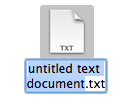 The neat
feature that I didn’t see anywhere else is filename highlighting :
when you create a new document, the document name is highlighted, in
order to customize the name without superfluous keystroke (ensure that
AppleScript GUI Scripting is enabled for this).
On the technical side, the plugin is written in C, using the
CoreFoundation API — and some bits of Carbon for file manipulation. I
could have integrated Cocoa code in there (easier to write and to
maintain), but keeping it C-only reduce overheight. Guaranteed without
memory leaks. Oh, and it uses AppleScript and GUI Scripting for the
“filename highlighting” feature : there is some nice code to execute an
AppleScript file from a Carbon program.
The plugin is hosted on Google Code and is Open-Source (MIT Licence).
Please read it, recompile it, fork it, whatever you want.
Download NewDocumentPlugin (Mac OS 10.4 to 10.5, 700
Ko)
See the project page on
GoogleCode